
Planning Guide
How Many LEGO Pieces Do I Need for a Mosaic?
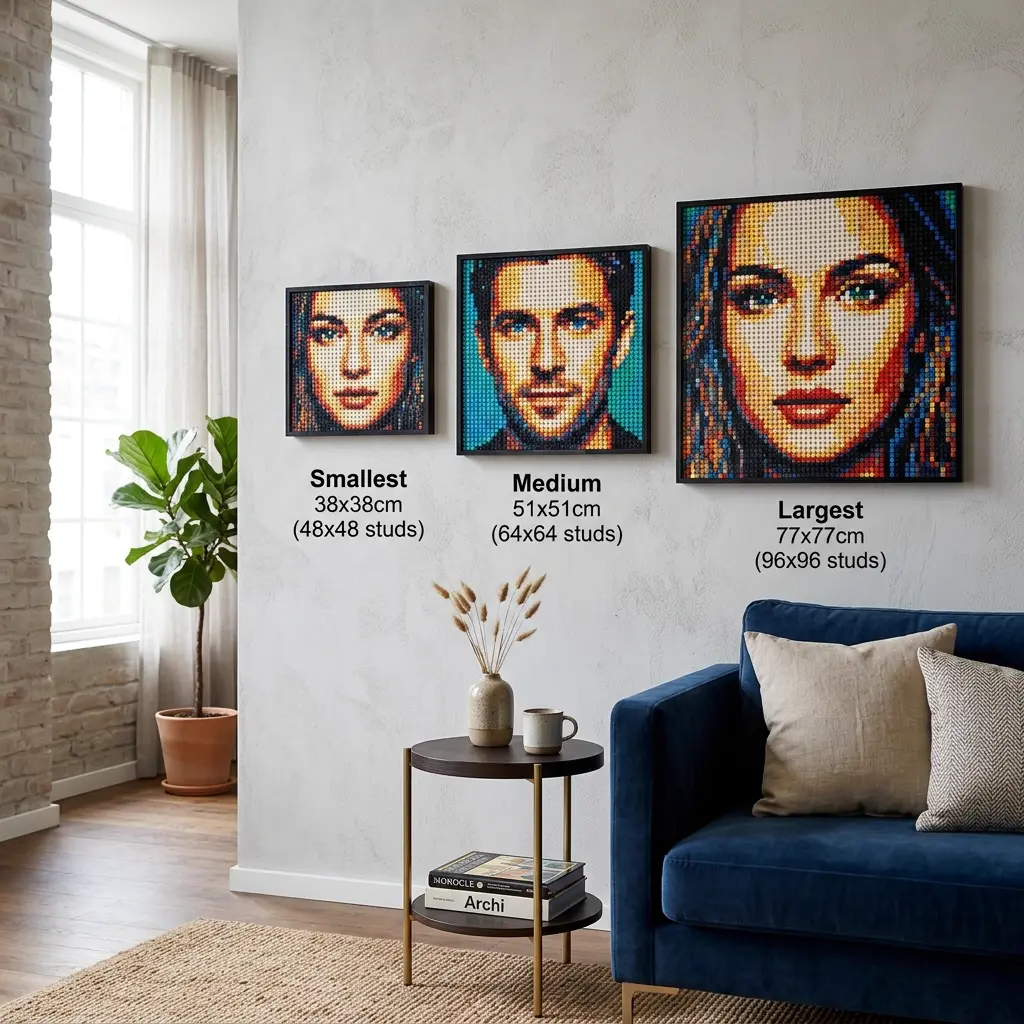
A small LEGO mosaic (48×48 studs) uses 2,304 pieces and costs about $138 from LEGO Pick a Brick. A medium mosaic (64×64) uses 4,096 pieces at $246. A large display piece (96×96) takes 9,216 pieces at $553. This guide breaks down every standard size with exact piece counts, costs from both LEGO and Webrick, and build-time estimates so you can plan before you order.
Direct answer: Most first-time builders do well with 3,000–4,500 pieces (48×64 to 64×64 studs). That range costs $180–$270 from LEGO official ($0.06/piece) or $90–$135 from Webrick ($0.03/piece). Build time is roughly 4–8 hours. If budget is tight, the biggest savings come from smarter cropping and background removal – not from forcing the cheapest sourcing route after the image is locked.
Best for: This guide helps anyone budgeting a mosaic project, especially first-time buyers, gift planners, and builders trying to decide whether a medium or large size is actually worth it.
Avoid: If you already know the exact board dimensions and are simply waiting for the final export, this article may be more strategic than you need.
Recommended setup: A 48×48 mosaic (2,304 pieces, ~$138) delivers a clean result for simple subjects. Jump to 64×64 (4,096 pieces, ~$246) for portraits that need more detail. Only go 96×96+ when the subject genuinely benefits from the extra resolution.
Who This Guide Helps
This guide helps anyone budgeting a mosaic project, especially first-time buyers, gift planners, and builders trying to decide whether a medium or large size is actually worth it.
Who Should Skip It
If you already know the exact board dimensions and are simply waiting for the final export, this article may be more strategic than you need.
Bottom Line
A 48×48 mosaic (2,304 pieces, ~$138) delivers a clean result for simple subjects. Jump to 64×64 (4,096 pieces, ~$246) for portraits that need more detail. Only go 96×96+ when the subject genuinely benefits from the extra resolution.
What changes piece count the fastest
Piece count is not random. Four project decisions control it directly.
Final dimensions
Going from 48×48 (2,304 pieces) to 64×64 (4,096 pieces) adds 78% more parts. Going to 96×96 (9,216 pieces) quadruples the original count. Make sure the added area improves the subject, not just the background.
Background commitment
On a typical portrait, 30–50% of pieces can be background. A 64×64 portrait with busy scenery might use 2,000+ pieces just on walls and furniture that add nothing to the face.
Subject isolation (Magic Cut)
Removing the background on a 64×64 portrait can drop the effective piece count from 4,096 to roughly 2,500–3,200 meaningful pieces, saving $50–$95 on LEGO sourcing alone.
Crop tightness
A tighter crop on the subject often lets you use a smaller board size entirely. Cropping a full-body shot to head-and-shoulders might let you drop from 64×96 (6,144 pieces, $369) to 48×64 (3,072 pieces, $184) – half the cost for a stronger result.
Piece count by mosaic size — the complete table
Every mosaic is a grid of 1×1 studs. Multiply width × height to get the exact piece count. Here are all standard sizes BMBrick supports, with real costs from both sourcing routes:
| Size (studs) | Pieces | LEGO PAB ($0.06/pc) | Webrick ($0.03/pc) | Physical size (cm) | Build time est. |
|---|---|---|---|---|---|
| 48 × 48 | 2,304 | $138 | $69 | 38 × 38 | 3–5 hrs |
| 48 × 64 | 3,072 | $184 | $92 | 38 × 51 | 4–7 hrs |
| 48 × 96 | 4,608 | $277 | $138 | 38 × 77 | 6–10 hrs |
| 64 × 64 | 4,096 | $246 | $123 | 51 × 51 | 5–8 hrs |
| 64 × 96 | 6,144 | $369 | $184 | 51 × 77 | 8–13 hrs |
| 96 × 96 | 9,216 | $553 | $277 | 77 × 77 | 12–20 hrs |
| 96 × 144 | 13,824 | $829 | $415 | 77 × 115 | 18–30 hrs |
Where count estimates go wrong
Most inaccurate budgets come from treating piece count like a fixed fact instead of a design choice.
Assuming bigger is automatically better
Going from 48×48 ($138) to 96×96 ($553) quadruples the cost. That only makes sense if the subject genuinely needs 9,216 pieces to read well. Most portraits look great at 4,096.
Estimating cost before choosing the crop
The crop decides whether you are paying for the subject or for the environment around it. A full-body shot on a 64×96 board (6,144 pieces, $369) might become a head-and-shoulders on 48×64 (3,072 pieces, $184) with a better result.
Ignoring build time as part of the budget
A 96×96 mosaic takes 12–20 hours to place. That is 3–5 sessions for most people. A 48×64 at 3,072 pieces takes 4–7 hours – one focused weekend afternoon. Time is a real cost, especially for gifts with deadlines.
Trying to fix budget problems after export
Switching from LEGO ($0.06/pc) to Webrick ($0.03/pc) saves 50% on parts. But if you locked in a 96×144 build (13,824 pieces), even Webrick costs $415. The bigger lever is always size and crop, not sourcing.
How to choose between small, medium, and large
Most people do not need a large build for a meaningful result. A 48×64 portrait (3,072 pieces, $184 LEGO / $92 Webrick) is the sweet spot for first-time builders – enough detail for a recognizable face, manageable build time (4–7 hours), and a display size (38×51 cm) that works on most walls.
Small projects are best when the image is naturally graphic, the subject is bold, or the goal is a quick personal keepsake. Medium projects are the sweet spot for most portraits and gifts. Large projects are worth it when the subject genuinely benefits from more nuance and when the room, budget, and build energy can support them.
How Magic Cut changes the math
Subject isolation removes background pieces that add cost but not meaning. On a typical 64×64 portrait (4,096 pieces), 30–50% of the grid can be background. Magic Cut replaces that area with a solid color fill, effectively reducing the 'meaningful' piece count to 2,500–3,200 while keeping the subject intact.
The savings are real: on a 64×96 build (6,144 pieces, $369 LEGO), removing a busy background can save $75–$150 worth of parts that were just filling space. And the build goes faster because solid-color background sections are trivial to place. Compare sourcing options with PAB vs BrickLink once the cleaner crop is in place.
Project planning checklist
The best sequence is to make the irreversible decisions last. Each step narrows the cost range before you commit money.
For photo selection tips, start with Choose the Right Photo. For sourcing strategy, see PAB vs BrickLink. For managing long builds, read Anti-Fatigue Building.
- Pick your photo and crop tight on the subject — this alone can halve the piece count.
- Choose a board size from the table above. For most portraits, start at 48×64 (3,072 pieces, $184).
- Try Magic Cut if the background is busy — it can save 20–40% of parts.
- Check your budget: LEGO at $0.06/pc or Webrick at $0.03/pc. A 4,096-piece build is $246 vs $123.
- Estimate build time: roughly 1 hour per 500–800 pieces for a first-time builder.
- Upload to BMBrick, preview the result, and adjust before you order.
How to use this guide as a real project checklist
A practical build guide is most valuable when it changes the order of operations, not just the level of confidence. The best sequence is to make the irreversible decisions last. Start with the source image or framing choice, confirm that the subject still reads, estimate whether the size and cost remain realistic, and only then worry about detailed sourcing or final presentation. That order protects you from solving downstream problems for an upstream decision that was never stable.
Most frustration comes from skipping that sequence. Builders often jump to the fun part too early, then discover that the image was weak, the size was unrealistic, or the build flow was harder than expected. Slowing down for one honest planning pass is usually the cheapest improvement available. It turns avoidable surprises into conscious trade-offs and makes the later build feel calmer rather than more complicated.
- Make one upstream decision at a time and do not lock the next step until the previous one feels stable.
- Test the project under the conditions that actually matter: real budget, real deadline, real display space, and real stamina.
- Use the follow-up guides as checkpoints, not as optional reading, whenever the project still feels uncertain.
For most builders, the best next pair of checkpoints is 48 vs 64 vs 96 Sizes and Choose the Right Photo. Those two reads usually expose whether the plan is genuinely ready for export or only emotionally tempting right now.
How BMBrick helps you plan
BMBrick shows you the piece count, cost estimate, and visual preview before you order anything. Upload a photo, pick a board size, and the tool calculates exactly how many pieces you need and what they cost from each sourcing route.
If you want a stronger budgeting workflow, use this article together with PAB vs BrickLink for sourcing strategy and Anti-Fatigue Building for the time-and-energy side of the decision.
FAQ
How many LEGO pieces do I need for a small mosaic?
A small mosaic at 48×48 studs uses exactly 2,304 pieces. At LEGO Pick a Brick pricing ($0.06 per 1×1 plate), that costs about $138. From Webrick ($0.03/pc), the same build costs $69. Build time is roughly 3–5 hours.
How many pieces for a medium LEGO mosaic?
Medium mosaics range from 3,072 pieces (48×64 studs, $184 LEGO) to 4,096 pieces (64×64 studs, $246 LEGO). This is the sweet spot for portraits and gifts — enough detail for a recognizable face at a manageable cost and build time of 4–7 hours.
How much does a LEGO mosaic cost?
Parts cost depends on size and sourcing. From LEGO Pick a Brick at $0.06/piece: small (2,304 pcs) = $138, medium (4,096 pcs) = $246, large (9,216 pcs) = $553. From Webrick at $0.03/piece, all costs are halved. Shipping is additional.
What is a good first-project piece count?
3,000–4,500 pieces (48×64 to 64×64 studs). That range costs $184–$246 from LEGO or $92–$123 from Webrick, and takes 4–7 hours to build. It is enough for a detailed portrait without being overwhelming for a first-time builder.
Does more pieces always mean better quality?
No. A well-cropped 48×64 portrait (3,072 pieces) often looks better than a loosely framed 96×96 (9,216 pieces) where half the area is wasted on background. Composition matters more than raw count. Spend your budget on the subject, not on empty space.
Where To Go Next
Next reads: